The Live Sessions feature in the Skylark Web Portal helps Operational Control (OC) manage people on-site, giving you real-time updates on who is currently onsite and when they are expected to check-off. You can see details of the purpose of each site visit, when technicians last checked in with a Waypoint, who they are working with, and when they are scheduled to check off. You can also check their last known location and quickly find their contact details.
Skylark Live Sessions provides full visibility of the work party when more than one technician is working on the same session. You can view the reason for the site visit, details of the site asset that is being worked on, and any comments posted by the on-site staff relating to the job.
Searching and Filtering Live Sessions
Live Sessions can be searched for individual technicians, for contract companies, and for sessions on specific sites. Use the search function to quickly find the sessions you need to monitor.
A recent update to Live Sessions has streamlined how the OC identifies the highest priority live sessions by introducing "quick picks" for filtering the displayed sessions. These quick picks help you focus on the most immediate and critical tasks by showing sessions that require your attention.
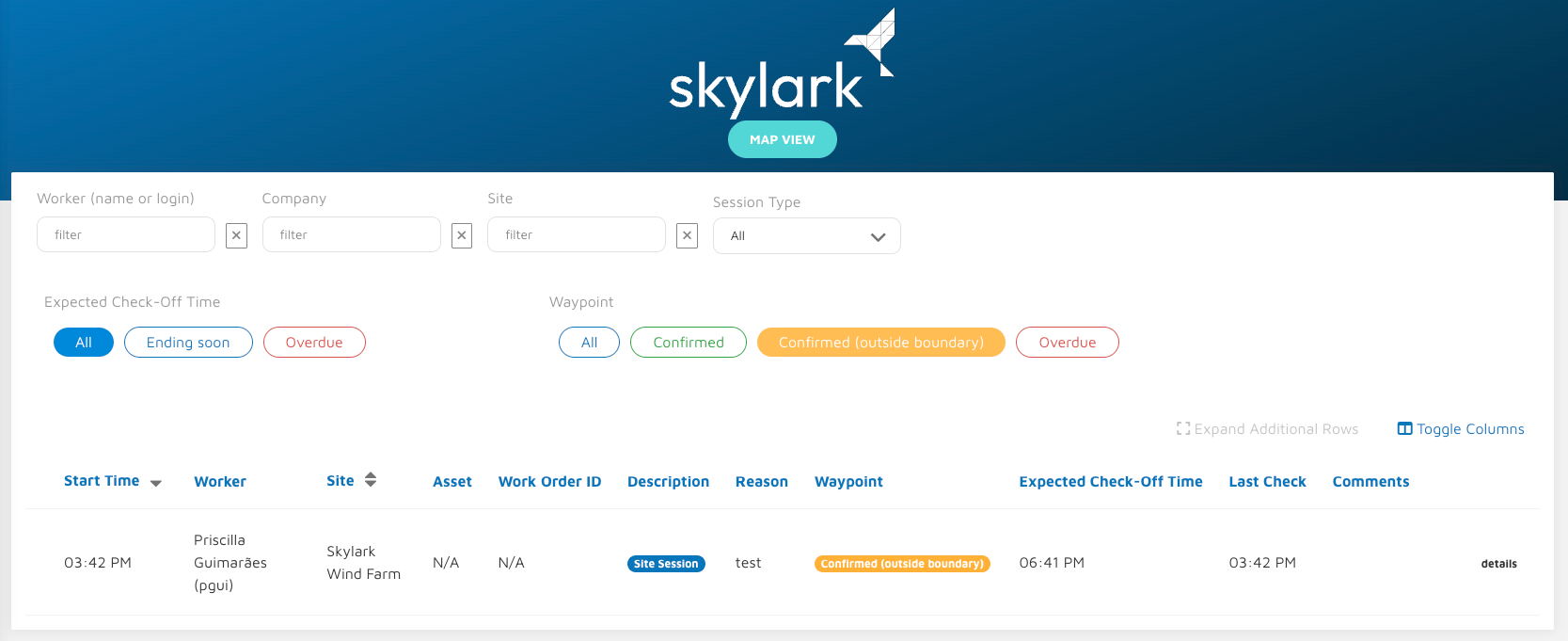
The complete list of quick picks currently available is as follows:
Site Sessions Ending Soon - Shows sessions where technicians are due to check off in the near future, helping you prepare for their departure and any follow-up actions.
Site Sessions Overdue - Displays sessions where technicians have overrun their expected check-off time. These sessions require immediate attention to confirm the technician's safety and understand why they remain onsite.
Waypoints Confirmed - Shows sessions where technicians have recently sent a waypoint update, providing confirmation that they are safe and continuing to work.
Waypoints Confirmed Outside the Site Boundary - Displays sessions where technicians have sent a waypoint update from a location outside the expected site boundary. This may indicate the technician has moved to a different work area or requires follow-up to confirm their location.
Waypoints Overdue - Shows sessions where technicians have not sent a waypoint update within the required time-frame. These sessions are a priority safety concern and require immediate contact to confirm the wellbeing of the technician.
Use these quick pick filters to prioritise your monitoring activities and ensure all on-site personnel are accounted for and working safely.
Was this article helpful?
That’s Great!
Thank you for your feedback
Sorry! We couldn't be helpful
Thank you for your feedback
Feedback sent
We appreciate your effort and will try to fix the article