The Skylark mobile App uses Waypoints as a safety feature to keep Operational Control (OC) updated on your status and location while you're working on-site. Waypoints provide regular confirmation to the OC that you are on-site and that you are safe. Missing a scheduled waypoint notification is treated as a cause for concern about your safety.
Waypoints are configured by the Site Owner, but typically they occur every 4 hours. This means you need to check in with OC at least once every 4 hours, or within whatever time-frame has been set for your specific site.
Sending Waypoint Updates
A key feature of Skylark Waypoints is that you don't have to wait for a waypoint to expire before updating the OC. You can send a waypoint update at your convenience, ahead of schedule. By choosing when to send updates, you can make informed decisions about when it's safe to use the Skylark App.
For example, before starting a complex maintenance task you can send a waypoint update so that you won't be disturbed or required to interact with the Skylark App when you need to focus on the task at hand. Remember though, you still need to check in at minimum every 4 hours (or within the configured time for your site).
How to Send a Waypoint Update
Once you have used the Skylark App to check onto a site and your site session has started, you can access the waypoint feature from your active session screen. You'll see your session timer at the top of the screen, and below that information about your next scheduled waypoint.
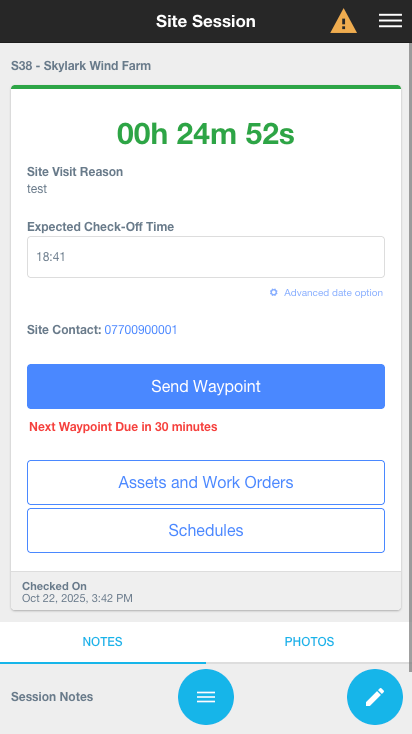
To send a waypoint update ahead of schedule, use the “Send Waypoint” button provided and your waypoint will be recorded on Skylark and the OC will be notified that you've checked in.
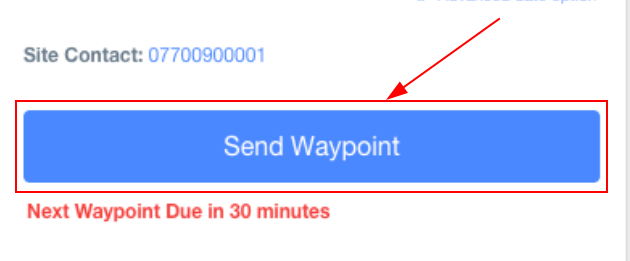
The timer for your next waypoint will reset, giving you the full configured time period (typically 4 hours) before your next mandatory check-in.
What Happens if I Miss a Waypoint?
If you don't send a waypoint update within the required timeframe, the OC will be alerted. Missing a waypoint is treated as a potential safety issue, and the OC may attempt to contact you or send someone to check on your wellbeing. Always try to send your waypoint updates on time, and use the ahead-of-schedule feature to check in before you start work that might prevent you from accessing the App later.
Was this article helpful?
That’s Great!
Thank you for your feedback
Sorry! We couldn't be helpful
Thank you for your feedback
Feedback sent
We appreciate your effort and will try to fix the article